Taxi and Cab Compliance · Owner Guide
Which cabs need one, where it goes in the car, what happens when a passenger presses it, and how to get it fitted and certified in a single day.
By Navionyx Team · October 2026 · 24 min read

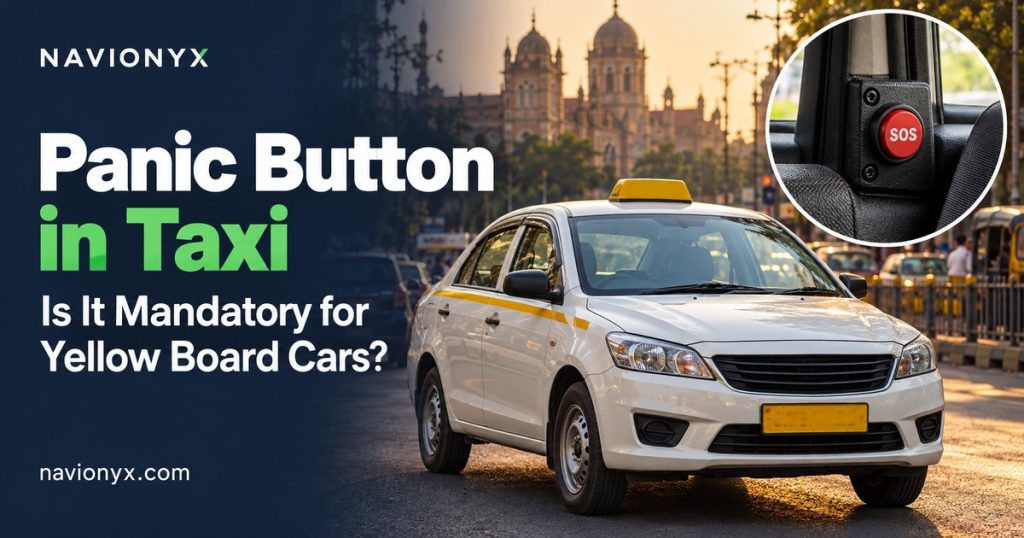
If you own or drive a yellow board car, the panic button in your taxi is not optional. Any car that carries paying passengers on a commercial permit is expected to have an AIS 140 vehicle location tracking device with at least one emergency button, and the RTO checks it when the car comes in for fitness renewal. If you are planning panic button installation for taxis, this guide explains exactly which cars are covered, where the button should be fitted, what a passenger sees when they press it, and how to get the whole job done in one day.
We wrote this for taxi owners, drivers who own their car, and small cab operators running anywhere from two to fifty vehicles. The questions we answer are the ones owners ask us most often: Does my electric cab with a green plate count? Is my tourist permit car covered? Will an app based cab platform stop my rides if the button is not working? Do I need one in my private car? Can I just buy any SOS button online and fit it myself?
One idea runs through every answer. In India, the panic button is not a separate gadget. It is the emergency input of the tracking device installed in your car. Pressing it tells the device that something is wrong, and the device sends an alert with the live location of the vehicle. A button that is not connected to a certified, registered and active tracking device will not help a passenger and will not pass an inspection.
Key takeaways
✓ Every four wheeler taxi on a commercial permit needs an AIS 140 tracking device with one or more panic buttons under Rule 125H of the Central Motor Vehicles Rules.
✓ The plate colour is a clue, not the test. What matters is the permit. Electric taxis with green plates are covered just like yellow board cars.
✓ The national aggregator guidelines of 2025 expect app based cab platforms to onboard only vehicles with a working tracking device and panic button.
✓ In a car, the button that matters most is the one a rear seat passenger can reach without asking the driver.
✓ A private car does not need one. A private car used as a taxi without a commercial permit is a much bigger problem than a missing button.
The Short Answer: Yes, If Your Car Carries a Commercial Permit
People search for “panic button for yellow board car” because the yellow plate is the most visible sign that a car is a taxi. That is a good starting point, but it is not quite how the rule works. The law does not look at the colour of your plate. It looks at whether your vehicle is a public service vehicle, which in simple terms means a vehicle that carries passengers for hire or reward under a permit.
For most owners the two things line up. A car registered as a commercial passenger vehicle gets a yellow plate with black letters and runs on a taxi, contract carriage or tourist permit. That car needs a tracking device with a panic button. A car registered for personal use gets a white plate and does not. Where it gets confusing is with electric vehicles and rental cars, which use different plate colours. The table below clears that up.
| Plate | What it usually means | Panic button needed? |
|---|---|---|
| Yellow plate, black letters | Commercial passenger or goods vehicle | Yes, for any car carrying passengers on a permit |
| Green plate, yellow letters | Commercial electric vehicle | Yes, an electric taxi is treated the same as a yellow board taxi |
| Black plate, yellow letters | Self drive rental vehicle | Varies by state, so confirm with your RTO |
| White plate, black letters | Private vehicle | No |
| Green plate, white letters | Private electric vehicle | No |
The electric taxi row deserves extra attention. As more cab operators switch to electric cars, we regularly meet owners who assumed that a green plate put them outside the yellow board rules. It does not. If the car carries paying passengers on a commercial registration, it needs the same tracking device and panic button as any diesel or CNG taxi, and it will face the same check at fitness renewal.
What the Rules Say About a Panic Button in Taxi
Two sets of rules apply to taxis. The first is the motor vehicle rule that applies to every commercial passenger vehicle. The second applies only if you drive for an app based cab platform. Knowing both helps you understand who will check your button and when.
Rule 125H: the base requirement for every taxi
Rule 125H was added to the Central Motor Vehicles Rules, 1989 by a notification of the Ministry of Road Transport and Highways dated 28 November 2016. It requires public service vehicles to be fitted with a vehicle location tracking device and one or more emergency buttons. The rule leaves out two wheelers, three wheelers, e rickshaws and vehicles that do not need a permit, which is why your neighbourhood auto rickshaw does not carry one but a sedan taxi does.
The ministry then issued the Motor Vehicles (Vehicle Location Tracking Device and Emergency Button) Order, 2018, which set the start date. Every new public service vehicle registered on or after 1 January 2019 must come with the device and button. For older vehicles, each state notifies its own deadline, and most states now ask for it at the next fitness renewal. The order also asks states to check the fitment and working status of the device during the fitness inspection, and it places a continuing duty on the owner to keep the device working and sending data.
The device must meet AIS 140, the national standard for vehicle tracking in public transport. If you want to understand the standard in more depth, our plain language guide to AIS 140 compliance covers it in detail.
The aggregator guidelines: an extra layer for app based cabs
If you drive for an app based cab platform, there is a second set of rules that matters just as much in practice. The Motor Vehicle Aggregator Guidelines, 2025, issued by the Ministry of Road Transport and Highways, ask platforms to make sure every onboarded vehicle has a functional vehicle location tracking device with a panic button, and that location data reaches both the platform’s control room and the state’s command and control centre. The same guidelines expect onboarded vehicles to hold a valid fitness certificate and insurance.
States adopt these guidelines into their own aggregator rules, so the exact wording and timeline differ from state to state. The direction is clear, though. Platforms are under pressure to prove that every car on their network has a working panic button, and the simplest way for them to do that is to block cars that cannot show it.
Think of it as two gates. The RTO checks your device once a year at fitness renewal. The platform can check it every day. For an app based cab driver, the platform gate is often the one that closes first.
Which Taxis Are Covered
“Taxi” covers many kinds of business in India. Here is how the rule applies to each type of car we see on the road, along with the vehicles that are outside it.
| Vehicle type | Covered? | What to know |
|---|---|---|
| City taxi (street hail) | Yes | Checked at fitness renewal; older cars follow the state deadline |
| App based cab | Yes | Checked by the RTO and expected by the platform under the aggregator guidelines |
| Tourist permit car | Yes | Interstate trips make a working device even more important, as checks can happen in other states |
| Airport taxi | Yes | Airport operators and taxi associations often check compliance before granting entry passes |
| Outstation and rental with driver | Yes | Same as any car on a contract carriage or tourist permit |
| Employee transport cab | Yes | Corporate clients usually ask for the certificate during vendor onboarding |
| Self drive rental car | Depends on the state | No driver carries passengers, so states treat these differently; confirm locally |
| Auto rickshaw and e rickshaw | Not under Rule 125H | Some cities and platforms add their own tracking requirements |
| Bike taxi | Not under Rule 125H | The aggregator guidelines extend tracking expectations to motorcycles on platforms; state rules vary |
| Private car | No | Covered in detail later in this guide |
Two practical notes come up again and again. First, owners of tourist permit cars sometimes assume that because they mostly run private bookings for families, they are not a “taxi”. The permit decides, not the type of customer. Second, operators supplying cabs to companies for staff transport are increasingly asked for the device certificate before a contract is signed, even before the RTO asks for it. Corporate clients carry their own duty of care for employees, especially women travelling at night, and the panic button is one of the first things their transport teams check. You can see how tracking, alerts and driver monitoring fit together for cab businesses on our taxi and mobility solutions page.
What Happens If Your Taxi Has No Working Panic Button
The consequences of skipping the panic button rarely arrive as a dramatic penalty on the road. They arrive as a blocked process at exactly the moment you need it to go smoothly. Here are the four places owners most often get stuck.
1. Fitness renewal is held up
The fitness inspection is where the device is checked. If it is missing, not registered against your car, or not reporting, the renewal is held until you fix it. Every day without a valid fitness certificate is a day the car should not be earning.
2. Permit work gets complicated
Permit renewal and permit transfer usually depend on valid fitness. A car stuck at the fitness stage cannot move forward on the permit either, which matters if you are selling the car or adding it to a new contract.
3. The cab platform stops your rides
Platforms ask for documents at onboarding and recheck them over time. Under the aggregator guidelines, they are expected to keep vehicles without a working tracking device and panic button off the network. For a driver who depends on app bookings, this is the most immediate loss of income.
4. Roadside checks and disputes
Transport enforcement drives check commercial vehicles for permits and safety equipment. In some states, a tampered or disconnected device can lead to strict action against the vehicle and its permit. And if a passenger ever makes a complaint, a working device with a clean location history is one of the strongest pieces of evidence you have.
The hidden trap: a button that is fitted but silent
The most common problem we see is not a missing button. It is a button that is physically there, with a certificate in the glovebox, connected to a device that stopped reporting months ago. The owner believes the car is compliant. The RTO system shows it as inactive. The platform flags it during a document check. The passenger presses the button and nothing reaches anyone.
A device usually goes silent for one of a few reasons: the yearly data and server plan was not renewed, the power wiring was disturbed during an accessory fitting or accident repair, the SIM inside the device lost its connection, or the device was moved to another car without being registered again. All of these are easy to fix, but only if someone notices. If your device has not been checked since it was installed, assume it needs a check before your next fitness date.
Where the Panic Button Is Fitted in a Car
Placement in a car is a different problem from placement in a bus. A taxi is small, the passenger usually sits in the back, and the person most likely to need the button may be worried about the driver himself. That last point shapes everything. A passenger who feels unsafe should be able to raise an alert without leaning forward, asking for anything, or making it obvious.
The rule asks for one or more emergency buttons at a conspicuous position, and some states and approved installation procedures specify more detail for passenger cars. Always follow what your state requires. Within that, here is the layout we recommend and why.
| Button position | Who uses it | Why it matters |
|---|---|---|
| Rear left, on the back of the front passenger seat or the side trim | Rear seat passenger | The most common seat for solo passengers in Indian cabs |
| Rear right, on the back of the driver seat or the side trim | Rear seat passenger | Covers passengers sitting behind the driver and groups of two or three |
| Near the driver, below the dashboard edge or by the gear console | Driver | For robbery, assault on the driver, a medical emergency or an accident |
Placement principles for cars
1. Reachable from the rear seat with a seatbelt on
Test it yourself. Sit in the back, buckle up, and reach for the button. If you have to lean forward or unbuckle, it is in the wrong place.
2. Visible, but not in the driver’s line of sight
The passenger should see the button as soon as they sit down. The driver should not be able to watch the passenger’s hand move towards it in the rear view mirror. Lower positions on the seat back or door side work well for this.
3. Protected from accidental presses
Children, bags, umbrellas and knees all hit rear buttons by accident. A flip cover or a recessed button stops most false alarms without slowing down a real one.
4. Clearly labelled
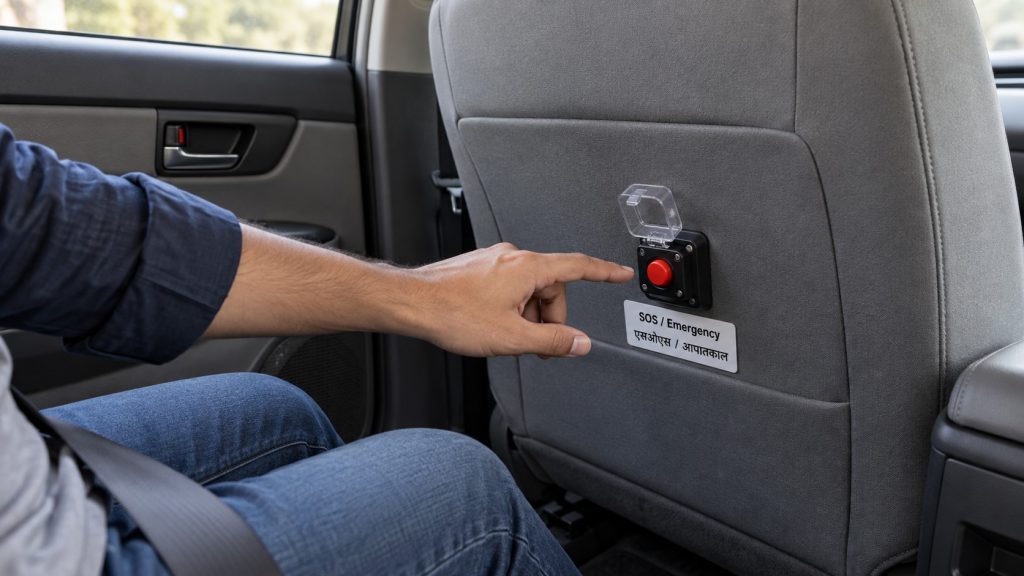
A label reading “SOS / Emergency” in English and the local language, with a short line such as “Press in an emergency. Your location will be shared.”, tells the passenger exactly what the button does.
5. Wiring hidden inside the trim
Exposed wires invite tampering and get pulled by seat covers and floor mats. Route them under the trim and make a note of the route, so the next workshop does not cut them while fitting seat covers or a music system.
What the passenger sees
From the passenger’s side, a good setup is simple. They see a clearly labelled button within reach. Many owners also put a small sticker near it showing the vehicle registration number and the national emergency number 112, so a passenger who prefers to call can quote the car number correctly. When they press it, a well installed system gives a small confirmation, such as a light or a short beep, so they know the alert has gone out and do not keep pressing in panic.
A visible, labelled button also does something quieter. It tells every passenger that this car is tracked and that someone outside the car will know if something goes wrong. For an owner, that is a trust signal worth having, especially for night trips, airport runs and solo women passengers.
What Happens When Someone Presses the Button
Drivers sometimes worry that a single press will bring police to the car within minutes for no reason, while passengers sometimes assume that pressing the button summons an instant rescue. The truth sits in between, and it helps both sides to understand the path the alert takes.
Step 1: The button signals the tracking device
The press triggers the emergency input on the device, which marks the event as an emergency and attaches the vehicle identity, time and current location.
Step 2: The alert goes out over the mobile network
The device sends the alert to the emergency response destinations set by the state, and to the tracking platform used by the owner. For app based cabs, location data is also expected to reach the platform’s own control room.
Step 3: Someone checks the situation
Depending on the state’s setup, a control room operator may call the vehicle, the owner, or the registered phone number, and decide whether to send help. On a fleet platform, the owner or fleet manager sees the alert with the car on a live map at the same time.
Step 4: Tracking continues and the event is logged
The car keeps reporting its position so responders can follow it. The event is recorded with time and location, which protects both the passenger and an innocent driver if questions come up later.
What a driver should do after a press
If a passenger presses the button, stay calm and keep driving safely towards a well lit, public place unless there is a reason to stop. Do not argue with the passenger or try to stop them. If you receive a call from the control room or your fleet owner, answer it and explain what is happening. If it was an accidental press, say so plainly. A driver who cooperates after an alert is always in a stronger position than one who appears to hide it.
If you are the one in trouble, for example during a robbery or after an accident, press your own button and, where it is safe, call 112. The alert gives responders your exact location even if you cannot speak.
Handling accidental presses in a taxi
False alarms in cabs follow a predictable pattern. Most come from the rear seat: a child playing with the button, a shopping bag pressed against the seat back, or a passenger resting a knee on a button mounted too low. A smaller number come from car washes and cleaning, when water or a cloth triggers an uncovered switch, and from loose wiring after body work.
When it happens, the response is simple. Answer any call that follows, confirm that everyone is safe, and explain that it was accidental. There is no fine for a genuine mistake. Then look at the cause. If one car keeps producing false alerts, have the button moved slightly higher, fitted with a flip cover, or the wiring checked. Fleet owners should also tell drivers to mention the button to families travelling with small children, the same way they would mention the child lock on the rear doors. A short sentence at the start of a trip prevents most of these alerts.
Why you should never disconnect it
Some drivers, frustrated by a false alarm or a call they did not expect, are tempted to pull the wire. This is the worst choice available. A disconnected device shows up as inactive, fails the next fitness check, gets flagged by platforms, and is treated as tampering in several states. If a button causes repeated false alarms, the fix is to move it, add a cover or repair the wiring, all of which take minutes for an installer.
Does My Private Car Need a Panic Button?
No. A car registered for personal use, with a white plate (or a green plate with white letters for a private electric car), is not a public service vehicle. Rule 125H does not apply to it, and the RTO will not ask for a tracking device or panic button at any stage.
The question usually comes from one of three situations, and the answer is different for each.
“I want to start driving my own car as a cab”
Then the panic button is the last item on a longer list. To carry paying passengers legally, the car has to be converted to commercial registration, which means a change of registration class, a yellow plate (or a green plate with yellow letters for an electric car), commercial insurance, a fitness certificate and a permit. The tracking device and panic button are fitted as part of that process, and the fitment certificate is one of the documents you will need at the RTO. Plan the conversion as one job, so the device is registered against the vehicle with its new commercial details from the start.
“I already drive my private car for bookings”
Then the missing panic button is the smallest of your problems. A private car carrying passengers for money without a permit is running illegally, and its private insurance may not cover an accident involving paying passengers. Fitting a panic button does not fix any of that. The safe route is to convert the car properly or stop taking paid bookings in it.
“I want one for my family’s safety”
That is a sensible choice, and nothing stops you. Private car owners can fit a GPS tracker with an SOS button that alerts family members. It does not need to be AIS 140 certified or registered with the state, because no rule requires it. Just be clear about what it does: it alerts the people you choose, not the state emergency system.
How to Get a Panic Button Fitted in One Day
For a single taxi with its documents in order, the whole process fits into one working day. The fitting takes a couple of hours. Most of the time is spent on registration and activation, which is why getting the paperwork right at the start matters so much.
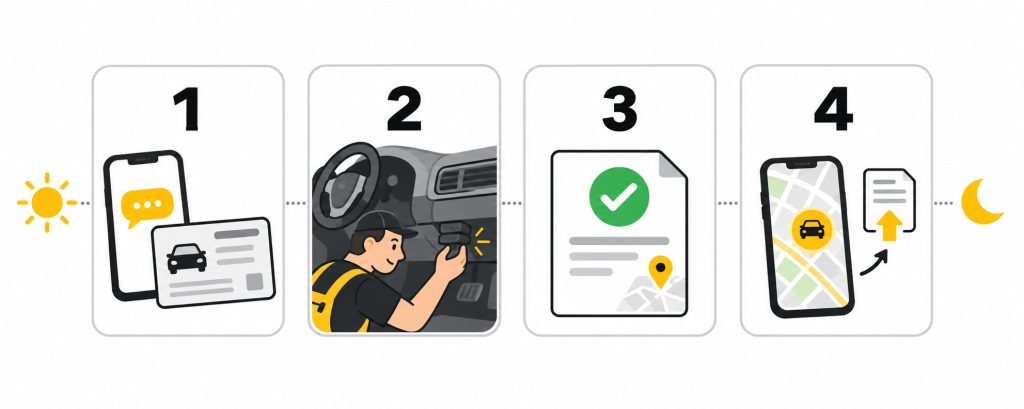
Step 1: Message us with your vehicle details
Send your vehicle number, city, and a photo of the RC. We confirm the device approved for your state, the number of buttons your car needs, and a fitment slot. If you already have a device that has gone silent, tell us, as a check and renewal may be enough.
Step 2: Fitment
The installer fits the AIS 140 device out of sight, wires it to the vehicle power supply, and mounts the panic buttons in the agreed positions. Every button is tested before the car leaves, and you should sit in the back and check the reach yourself.
Step 3: Registration and certificate
The device is registered against your vehicle on the state system and activated. Once it is reporting, you receive the VLTD fitment certificate, which records the device and the panic button fitment. Keep a PDF on your phone and a printed copy in the car.
Step 4: Upload to your cab platform and app
Upload the certificate wherever your cab platform asks for vehicle documents, and set up the tracking app on your own phone so you can see your car and any alerts. You are now ready for the next fitness check and platform document review.
Where the day can slip: a wrong digit in the chassis or engine number, a car registered in another state, or a state system that is slow to activate. Sending a clear RC photo in Step 1 avoids the first two. The third is outside anyone’s control, but it rarely takes more than a working day.
Documents to keep ready
✓ Registration certificate (RC) with clear chassis and engine numbers
✓ Current permit
✓ Owner’s name and mobile number exactly as they should appear on the certificate
✓ Your next fitness renewal date, so you can plan the fitment well before it
For Small Cab Operators: Keeping Every Car Compliant
If you run five, fifteen or fifty cabs, the challenge is not fitting the devices. It is keeping all of them working at once, across different drivers, different fitness dates and different renewal dates. One silent device can take a car off the road just when a corporate contract needs it. A simple routine prevents most of that.
| When | What to check |
|---|---|
| Every day | Every car that is on duty shows up on the live map; any car that is not reporting is flagged the same day |
| Every month | Review alert history, look for repeated false alarms from the same car, and check button covers and labels |
| When a driver joins | Show them the buttons, explain what happens after a press, and tell them who to call |
| After any repair or accessory fitting | Confirm the car is reporting and test the buttons before it goes back on duty |
| A month before each fitness date | Device active, plan valid, certificate saved and printed |
Keep all devices in one fleet account rather than a separate login per car. A single dashboard shows at a glance which cars are reporting, which plans expire this month, and which alerts came in overnight. It also gives you something valuable when bidding for staff transport contracts: proof that every car in your fleet is tracked and that alerts reach you, not just the state.
Stagger renewals sensibly as well. If you bought ten cars in the same month, their fitness and device renewals will all fall in the same week every year. Renewing devices a few weeks early on a rolling schedule avoids a crunch where half the fleet needs attention at once.
Finding Panic Button Installation Near You
Approved devices, state servers and activation procedures differ from state to state, so the installer you choose must be able to register the device on your state’s system. A device approved and activated in one state may need to be registered again if the car moves its registration to another. In busy taxi markets such as Mumbai and Pune, where fitness slots fill quickly, we suggest booking the fitment two to three weeks before your fitness date.
Choose your state below for local details on fitment, certificates and coverage:
Panic button installation in Maharashtra
Panic button installation in Karnataka
Panic button installation in Delhi NCR
Panic button installation in Telangana
Panic button installation in Tamil Nadu
Panic button installation in Kerala
Panic button installation in Gujarat
Panic button installation in Rajasthan
Panic button installation in Uttar Pradesh
Panic button installation in West Bengal
Panic button installation in Punjab
Panic button installation in Haryana
Panic button installation in Andhra Pradesh
Panic button installation in Madhya Pradesh
Panic button installation in Chhattisgarh
Panic button installation in Odisha
Panic button installation in Jharkhand
Panic button installation in Bihar
Panic button installation in Assam
Panic button installation in Uttarakhand
If you also run larger passenger vehicles, such as school vans or buses alongside your cabs, our guide to the panic button in school buses explains how button layout and responsibilities change for bigger vehicles carrying children.
Frequently Asked Questions About Taxi Panic Buttons
Can I buy any SOS button and fit it myself?
No. A loose SOS button bought online is just a switch. To count under the rule, the button must be wired to an AIS 140 certified tracking device that is approved for your state, installed by an authorised installer, and registered against your vehicle on the state system. A self fitted button with no registered device behind it will not show up in any official record, and a device that has been opened or rewired by someone other than an authorised installer may be treated as tampered. Ordinary GPS trackers with an SOS key fall in the same category, as our article on AIS 140 versus non AIS GPS trackers explains.
Does the fitment certificate cover the panic button too?
Yes. There is no separate panic button certificate. The VLTD fitment certificate records the tracking device and the emergency button fitment together, along with your vehicle and device details. When an RTO officer or a cab platform asks for a “panic button certificate”, this is the document they mean. The certificate alone is not enough, though. The device must also be active and reporting on the day it is checked.
What happens if I sell my taxi or buy a different car?
The device is registered against a specific vehicle using its chassis and engine numbers. If you sell the car, the device normally stays with it, and the new owner should update the owner details through the installer. If you want to move a device from an old car to a new one, it must be removed and fitted again by an authorised installer and registered against the new vehicle, with a fresh certificate. Simply unplugging it and fitting it yourself will leave the old car mapped to the device and the new car showing nothing.
What does the yearly renewal cover?
The panic button has no battery to recharge. What you renew each year is the tracking device’s data connection and server subscription, which let the device send location and emergency alerts to the state system and to your tracking app. The cost depends on the plan and the period you choose. If the renewal lapses, the device stops reporting, the car shows as inactive, and the next fitness check or platform document review will catch it. Put the renewal date in your phone calendar the day the device is fitted.
Conclusion: One Small Button, Fitted the Right Way
A panic button in a taxi is mandatory for every four wheeler that carries paying passengers on a commercial permit, whether the plate is yellow or green and whether the bookings come from the street, an airport queue or a cab app. The RTO checks it at fitness renewal, cab platforms are expected to check it before letting a car take rides, and corporate clients increasingly check it before signing a contract.
Getting it right is not complicated. Fit an AIS 140 device approved for your state, place the buttons where a rear seat passenger can reach them easily, keep the certificate on your phone, and renew the plan before it lapses. Do that, and the panic button stops being a compliance worry and becomes what it was meant to be: a quiet promise to every passenger that help is one press away.
This article was researched and written with AI assistance and reviewed by the Navionyx team. Rules, deadlines and approved devices differ by state and change over time. Confirm the current requirements with your RTO before planning a fitment.
Need a panic button fitted in your taxi?
Message us your vehicle number and city. We will confirm the approved device for your state, book a fitment slot, and get your certificate ready, usually within a day.
Book Your Fitment