Fleet Compliance · VLTD Guide
What the certificate really is, what is printed on it, how RTO officers check it, and what to do if you lose it.
By Navionyx Team · October 2026 · 8 min read

You are at the RTO for a fitness renewal or a permit, and the officer asks for your panic button certificate. Many vehicle owners have never seen a document with that exact name, so they assume something is missing. In most cases nothing is missing. You already have it, under a different name.
This guide explains what the panic button certificate actually is, what details are printed on it, where you will be asked for it, how to get a digital copy, and how RTO officers verify it. We also cover the situations that cause the most trouble: a lost certificate, a changed vehicle and a changed owner.
Is There a Separate Panic Button Certificate?
Short answer: No.
The panic button (also called the emergency button) is part of the AIS 140 Vehicle Location Tracking Device, or VLTD. When an authorised installer fits and activates the VLTD, the document issued is the VLTD fitment certificate. It records that the emergency buttons were installed along with the tracking device. That single document is what people and officers call the panic button certificate.
This matters because you cannot install a panic button on its own to get compliant. The buttons are wired to the VLTD, and the VLTD sends the alert to the state backend. So the certificate covers the whole system. If you are still planning the fitment, start with our guide to panic button and VLTD installation.
Public service vehicles such as taxis, cabs, school buses and other passenger carriers need this certificate. Two wheelers, e rickshaws and three wheelers are generally exempt, and your state transport department may add its own conditions. For category specific rules, read our guides on panic buttons in yellow board taxis and panic buttons in school buses.
What Is Printed on a VLTD Panic Button Certificate
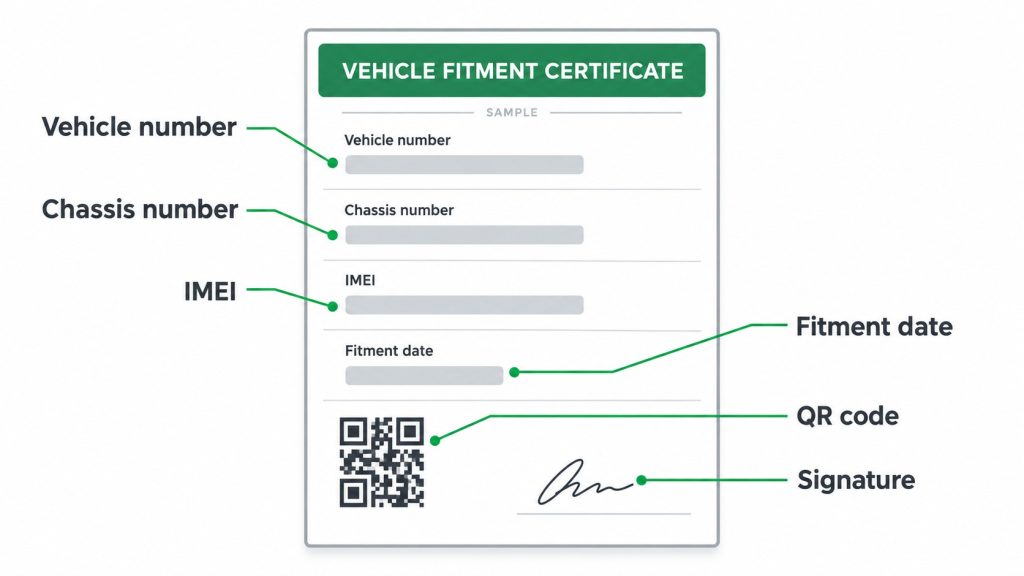
The exact layout differs by state and by device manufacturer, but a valid certificate carries the same core details. Every one of them should match your RC and the device fitted in your vehicle.
| Field | Why it matters |
|---|---|
| Vehicle registration number | Links the certificate to your vehicle in the transport records. |
| Chassis and engine numbers | Must match the RC exactly. A single wrong digit can get the certificate questioned. |
| Device make, model and IMEI | Identifies the exact AIS 140 device. The IMEI is how the backend finds your device. |
| SIM details | The SIM carries location and alert data. An expired SIM means no data reaches the backend. |
| Fitment date | Shows when the device and emergency buttons were installed and activated. |
| Installer or dealer details | Tells the officer who fitted the device and who to contact for corrections. |
| QR code | Lets the officer check the certificate online in seconds. |
| Authorised signatory | Confirms the certificate was issued by an authorised party. |
Our tip: Check the certificate against your RC the day you receive it, not the day of your fitness test. Chassis number typos are easy to fix early and stressful to fix at the RTO counter.
Where You Need the Panic Button Certificate
RTO fitness renewal
This is where most owners are asked for it. The officer checks the certificate and, more importantly, whether the device is live on the backend.
Permit issue or renewal
For permit vehicles, a valid VLTD fitment is usually a condition before the permit is issued or renewed.
Aggregator and platform onboarding
Ride hailing, staff transport and school transport operators often ask for the certificate before they add a vehicle to their platform or contract.
Insurance and vehicle transfer
Some insurers ask for it for commercial vehicles at renewal or during a claim. Buyers of used commercial vehicles also ask for it, since it shows the device is fitted and mapped.
Panic Button Certificate Download: How to Get a Digital Copy
In most cases there is no public page where an owner can type a vehicle number and download the certificate. The certificate is generated by the device manufacturer or its authorised dealer once the device is activated and mapped to your vehicle. So the fastest route is always your installer.
Step 1. Keep your vehicle registration number and RC copy ready. If you know the device IMEI, keep that too.
Step 2. Contact the dealer or installer who fitted the device and ask for the fitment certificate PDF for that vehicle number.
Step 3. Open the PDF and match every field with your RC: registration number, chassis number and engine number.
Step 4. Scan the QR code yourself with your phone camera to confirm it opens the verification details for your vehicle.
Step 5. Save the PDF on your phone, email a copy to yourself, and keep one printed copy in the vehicle.
If Navionyx fitted your device, just send us your vehicle number and we will share the certificate. You can also read more about our VLTD fitment certificate service.
How RTO Officers Verify the Panic Button Certificate
Officers no longer rely only on the paper. A typical check has three parts:
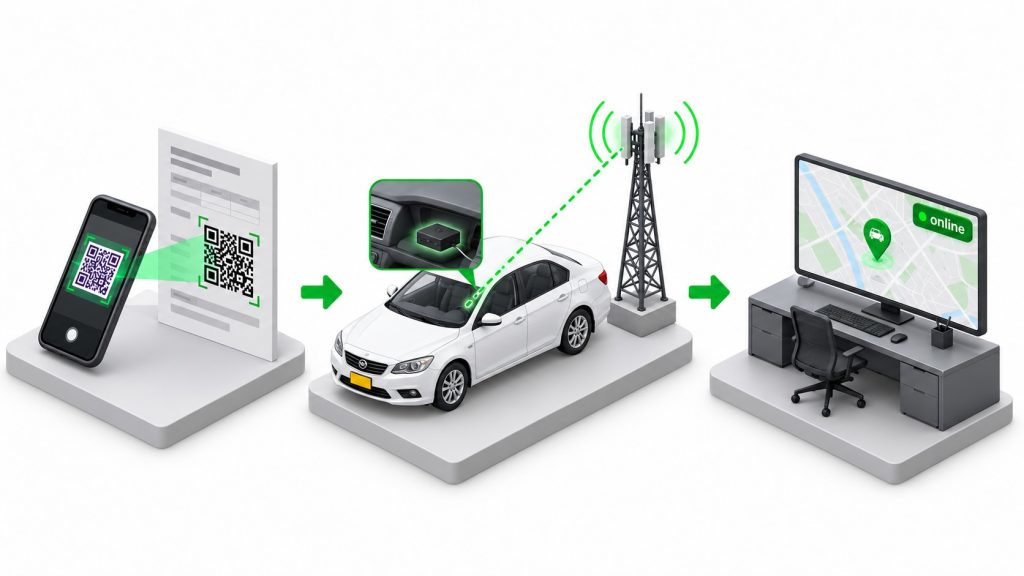
✓ QR scan. The QR code opens the certificate details, which must match the vehicle in front of the officer.
✓ Backend status. The officer checks whether the device IMEI is mapped to your vehicle and is sending live location data to the state backend or command and control centre.
✓ Button test. In some states the officer may ask you to press an emergency button to confirm that an alert reaches the backend.
Why an inactive device fails even with a valid certificate
The certificate proves the device was fitted. It does not prove the device is working today. If the backend shows your device offline, the vehicle can fail the check even with a perfect certificate in hand. Common causes:
Expired SIM or data plan · Device power cable disconnected or tampered · Damaged emergency button wiring · Device not mapped again after a repair or replacement
A simple habit prevents this. About a week before your fitness date, ask your installer to confirm the device is live on the backend and the data plan is active.
Lost Certificate, Changed Vehicle or Changed Owner
You lost the certificate
This is the easy case. The device and its records still exist, so your installer can issue a copy. Share your vehicle number and, if possible, the device IMEI printed on the device label.
You moved the device to another vehicle
A certificate belongs to one vehicle. If the device goes into a different vehicle, it has to be mapped again to the new registration and a new certificate issued. Depending on your state and the device, a fresh fitment may be required. Do not use the old certificate for the new vehicle.
The vehicle has a new owner
The device stays with the vehicle, but the owner and contact details in the backend should be updated so alerts and support reach the right person. Ask the installer to update the records and share an updated certificate if your state requires owner details on it.
The device was replaced
A new device has a new IMEI, so you need a new certificate. Make sure the old device is removed from the vehicle mapping to avoid a mismatch during the RTO check.
Sample Panic Button Certificate
Want to see what a complete certificate looks like before your RTO visit? View a sample on our certificate page and compare it with yours field by field.
VLTD Installation and Certificates in Your State
Rules and RTO checks vary a little from state to state. Pick your state for local installation and certificate details.
Frequently Asked Questions
Is the panic button certificate the same as the VLTD certificate?
Yes. The panic button is part of the AIS 140 VLTD system, so the VLTD fitment certificate is the proof of panic button installation. There is no separate document.
Can I download the panic button certificate myself online?
Usually not. The certificate is generated by the device manufacturer or authorised dealer. Ask your installer for the PDF using your vehicle number.
Will the RTO accept a PDF on my phone?
Many officers accept a clear digital copy because they verify through the QR code and backend anyway. Still, carry one printed copy, since practice can differ between RTO offices.
What happens if my device is installed but not active?
The vehicle can fail the check even with a valid certificate. The officer looks for live data on the backend, so renew the SIM or data plan and get the device checked before your fitness date.
Conclusion
The panic button certificate is simply your VLTD fitment certificate. Keep a digital and printed copy, make sure every detail matches your RC, and confirm the device is live on the backend before any RTO visit. Do those three things and the certificate check becomes a two minute formality instead of a lost day.
This article was written with AI assistance and reviewed by the Navionyx team.
Need a panic button installed or a certificate checked?
Navionyx fits AIS 140 VLTDs with emergency buttons and helps you get your certificate ready for the RTO.
Chat With Our Team →